AI TOOL / #04081
GPT Notification/Quiz – STRI
An AI-driven extension designed to provide fast and accurate answers to questions.
Introduction
An AI-powered extension for quick and accurate question answering.
What is an AI Assistant Extension, namely the Chrome extension/plug-in for AI Assistant?
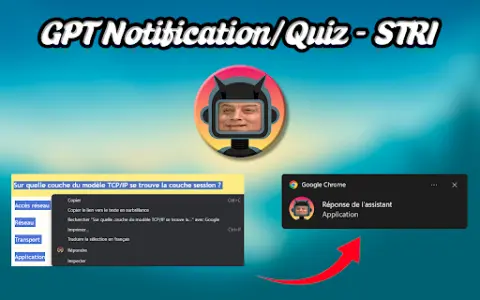
This extension was initially created by students to help answer various surveys quickly. Through interactive pop-ups, it uses your API key and the selected AI model to provide accurate and timely responses, functioning as a real-time intelligent assistant tool.
How to use the AI Assistant Extension for Chrome? How to install and use this add-on/plug-in?
To install the extension, right-click on its icon and select “Options” to enter your API key and choose the AI model you wish to use for configuration. When using it, select the text of the question, right-click on it, and then choose “Answer”. Make sure that notifications are enabled so that you can receive real-time alerts. You can also customize settings in the Options section, such as the visual theme.
The core functionality of the AI Assistant extension for Chrome.
Interactive pop-up window
Model customization
Visual theme
API key integration
Model customization
Visual theme
API key integration
Related
PlaygroundAI
An online AI tool and community center that offers meticulously curated AI resources and AI-powered tools.
ChatGPT for Twitter
A Chrome extension designed for AI-driven tweet generation, multilingual support, and AI-based tweet detection.
Humanize.io
A tool that humanizes AI-generated text to make it sound more natural and engaging.
Parental Search – Keep your kids safe
Artificial intelligence-based tools protect children from harmful online content by blocking potentially dangerous search results.
Bouclier anti-haine
The shield replaces offensive insults with symbols and provides suggestions for how to respond in such situations.
imagga.com
The Image Recognition API is used for tagging, classification, visual search, and content moderation.