AI TOOL / #04208
Shift-Ctrl-F: Semantic Search for the Browser
A Chrome extension that uses MobileBERT to search for and highlight answers on web pages.
Introduction
Chrome extension using MobileBERT to search and highlight answers on webpages.
What is the Shift-Ctrl-F Chrome extension/plugin?
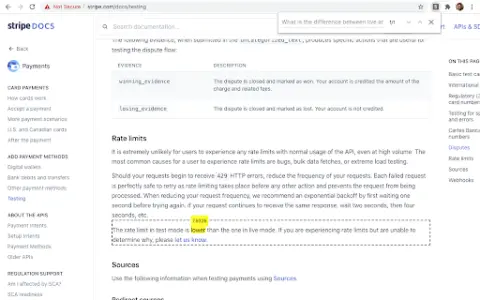
Shift-Ctrl-F is a Chrome extension that utilizes the MobileBERT model, which has been fine-tuned using the SQuAD dataset. This extension uses TensorFlowJS to search for answers on web pages and identify relevant elements. It allows users to enter natural-language queries and find corresponding answers within the content of the current page.
How to use the Shift-Ctrl-F Chrome extension/plugin?
1) Open the extension pop-up window using the toolbar or shortcut key (Shift-Ctrl-F).
2) Enter your natural language query in the search box.
3) Press Enter and wait for the model to return the results.
The core functionality of the Shift-Ctrl-F Chrome extension/plug-in.
Conduct natural language question-and-answer interactions on web pages.
Highlight relevant elements based on the search query.
Efficient processing using MobileBERT
Highlight relevant elements based on the search query.
Efficient processing using MobileBERT
Related
New Beam.win
Move the window from another Mac to use it
New CADdillo
Simply describe the layout of the apartment, and an editable CAD floor plan will be generated automatically.
The new MiniMax Design
The multimodal AI creation desktop studio launched by MiniMax
New shim-cli
Privacy audit of content sent by programming intelligent agents
MikeOSS
Open-source, self-hostable legal AI platform
Buddy Sandboxes
Cloud Linux sandbox for AI programming agents