AI TOOL / #05246
uFinance: Yahoo Finance Upgraded
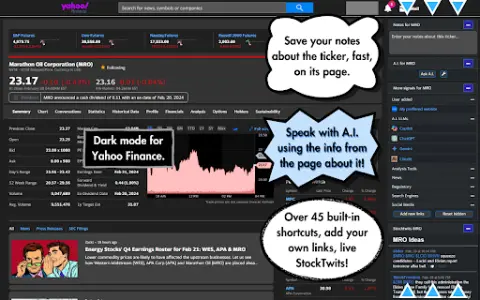
uFinance enhances Yahoo Finance with a dark theme, shortcuts, AI chat, notes, and StockTwits integration.
Introduction
uFinance enhances Yahoo Finance with a dark theme, shortcuts, A.I. chat, notes, and StockTwits integration.
What is the uFinance AI Chrome extension/plugin?
uFinance is a browser extension designed to enhance the Yahoo Finance experience. It offers a sleek dark theme, curated links for each stock, sidebar shortcuts, a quick search feature, real-time AI chat integration, note-taking capabilities, and StockTwits integration. It is designed to provide users with a more comprehensive and efficient way to access and analyze stock market data.
How do I use the uFinance AI Chrome extension/plugin?
Install the uFinance extension in your browser. Once installed, navigate to Yahoo Finance. You’ll discover new features such as a dark theme, sidebar shortcuts to each stock’s URL, a notes box, and StockTwits integration. Use the AI chat feature to get answers to stock-related questions.
Core Features of the uFinance AI Chrome Extension/Plugin
Sidebar shortcuts to important URLs for each stock
Quick Search Feature
Real-time AI chat integration compatible with multiple language model options
Note-Taking Feature
StockTwits Integration
Enhanced Dark Theme
Quick Search Feature
Real-time AI chat integration compatible with multiple language model options
Note-Taking Feature
StockTwits Integration
Enhanced Dark Theme
Related
Google Books
Google Books Search and Digital Reading Platform
LibraryThing
Personal Book Collection Management and Book Exchange Community
Wikibooks Chinese
Chinese Open Access Digital Library of Literature
Medium
Community for independent authors to publish their content
BookSeriesInOrder
Website for querying the reading sequence of a series of books
The Rumpus
Independent literary and artistic website