AI TOOL / #05336
Legal Red Flag Detector
A Chrome extension that uses AI to identify potentially problematic elements in legal documents.
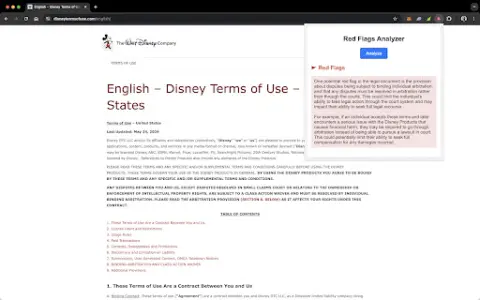
Introduction
Chrome extension that uses AI to detect red flags in legal documents.
What is the Legal RedFlag Detector AI Chrome extension/plug-in?
The Legal Red Flags Detector is a Chrome extension designed to identify potential red flags in legal documents, such as terms of service, privacy policies, and user agreements. It utilizes AI technology to highlight clauses that may be harmful to users and provides clear explanations, eliminating the need for legal expertise.
How to use the Legal RedFlag Detector AI Chrome extension/plug-in?
Install the extension, open the web page containing the legal document, and click “Analyze” in the pop-up window. This will display highlighted sections marked with red flags, along with simple explanations.
The core functionality of the Legal RedFlag Detector AI Chrome extension/plugin
Automatic analysis of legal documents
Prominent clauses regarding potential issues
A popular explanation of the red flag
Intuitive interface in the pop-up window
Related
Table OCR – Extract tabular data from Pdf/Img
Table OCR extracts data from tables within images or PDF files and converts it into a structured format.
Copywrite+
An AI-based tool that converts handwritten content into formatted digital text and documents.
OLOCR
Free online OCR service for images and PDF files, supporting batch processing and multiple languages.
Chrome Virtual Camera
Use the clock, video file, and background masking options in place of getUserMedia().
Business Card Scanner
An online business card scanner that uses OCR technology to convert physical business cards into digital format.
Movielyzer
An artificial intelligence-powered video search tool that assists users in accurately finding the content they are looking for.