AI TOOL / #06171
Patsa – AI-powered Meeting Copilot
A Chrome extension that enables real-time transcription and AI-powered Q&A during online meetings.
Introduction
Chrome extension for real-time transcription and AI-powered Q&A during online meetings.
What is the Patsa AI Chrome extension/plugin?
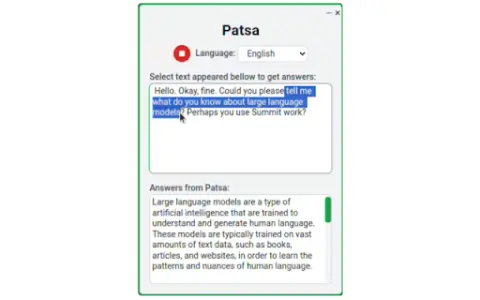
Patsa is a Chrome browser extension designed to enhance online meetings on platforms such as Google Meet, Zoom, and Teams. It transcribes other participants’ speech in real time and lets users select transcribed text to ask AI questions, providing instant information and answers.
How do I use the Patsa AI Chrome extension/plugin?
1) Launch the Patsa extension in any online meeting in Chrome. 2) Click the "Start Transcribing" button to transcribe what the other participants are saying. 3) Select the transcript text you want to ask the AI about, and you'll receive an instant response from the AI.
Core features of the Patsa AI Chrome extension/plugin
Real-time transcription of participants’ speech
AI Q&A based on transcribed text
Related
The new Parrot
An open-source, free local meeting note-taking tool for Mac.
New Nueve
Automatically convert photos of restaurant dishes into short videos and post them on social media platforms.
New Harness
A command center for the unified coordination of multiple AI agents
New Lancetta
Codex and Claude Code: Your Personal Quota Management Tools
新TimelinesAI WhatsApp MCP
WhatsApp Integrates MCP for AI Agents
New Wonderslide: Converting PDF Files to PPT Format
Free conversion of PDF files into editable PPTX format