AI TOOL / #07462
Vision AI
A Chrome extension that enables AI-driven insights based on screenshot data.
Introduction
Chrome extension for AI-powered insights from screenshots.
What is a Vision AI Chrome extension/plug-in?
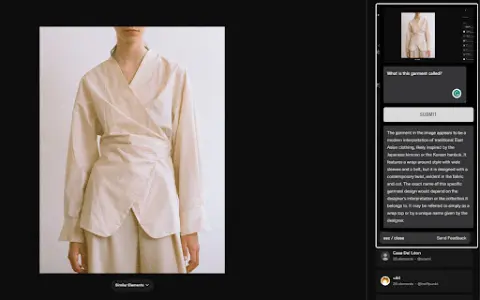
Visual AI is a Chrome extension that combines screenshot functionality with AI-driven insights to enhance online information search. It allows users to capture any portion of a web page, add notes or questions, and receive AI-generated responses based on the context of the captured image.
How to use the Vision AI Chrome extension/plug-in?
Install the Visual AI Chrome extension. Use CTRL + SHIFT + Y to take a screenshot, and then add any notes or questions you have. Visual AI will analyze the screenshot and provide an AI-generated response.
The core functions of the Vision AI Chrome extension/plugin
Screenshot capture
Interactive AI Suggestions
Seamless browser integration
Suitable for a wide range of applications in various fields
Privacy and Security
Related
ChatDesigner
An AI platform used for creating fashion models and conducting photography sessions.
General Reasoning
Making reasoning AI accessible through reinforcement learning, in service of intelligent and safe machines.
Future AGI
An AI evaluation and optimization platform for automated quality assessment and performance improvement.
Gemma Open Models by Google
Resources and tools for building AI models in collaboration with Google.
Trivia Glide
An AI-powered quiz app that provides instant feedback and progress tracking.
Steam BR prices
Browser extensions automatically check and display the prices of Steam games mentioned in forum posts, showing how these prices vary depending on the region.